AI Rap Trend
Video Generator
Turn two portraits into a coordinated AI rap duo video. The prepared performance supplies the rhythm, movement and camera work while your photos supply the new cast, making this a focused route into the broader AI rap trend.
Your performance studio
Two portraits. The original clip from 0 seconds. Original audio.
Original performance
Starts at 0:00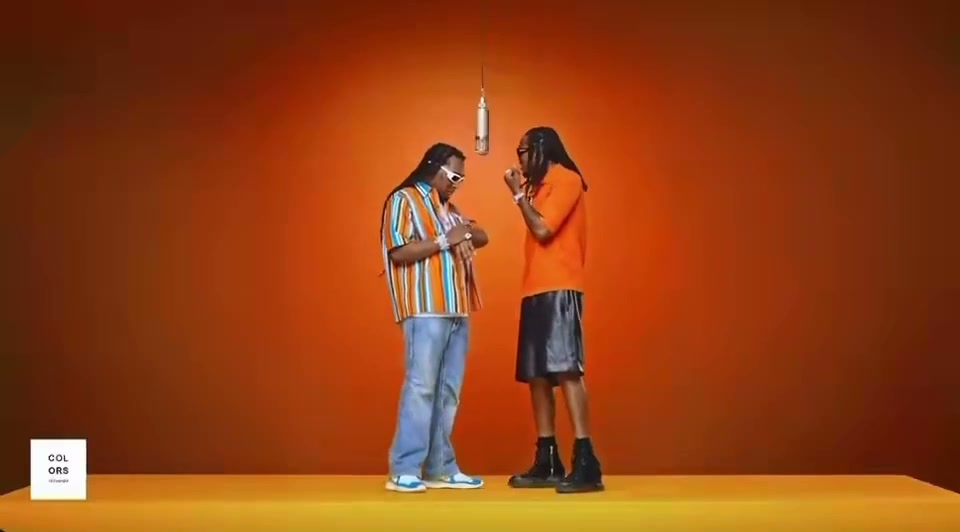
Watch the opening and listen to the clip before generating. Your result uses this exact segment as its input.
What will change
The left performer takes the first portrait’s identity; the right performer takes the second. The model is asked to preserve the scene, gestures and camera movement.
Small timing differences are aligned to the source length. Face quality and lip sync need your review.
Your cast
Photos are kept in this browser for up to 24 hours so you can return after checkout. If browser data is cleared, you may need to upload again.
Resolution & frame480p · 16:9
Reviewing is free. Credits are reserved only after your final confirmation.
Watch a completed Hotel Lobby AI example or check video credits and pricing before you generate.
Build an AI rap duo from two still images.
- 01
Start with a readable cast
Use two separate portraits with one consenting adult in each. A front-facing or gently angled image with even light helps preserve the visual difference between performers when both are moving in the same shot.
- 02
Fit the performance to the platform
Preview the source, then select a duration and resolution. Use 16:9 when the complete two-person composition matters, 1:1 for a balanced feed post or 9:16 when a centered vertical crop suits a short-form channel.
- 03
Review motion as well as faces
An AI rap video is more than a still face replacement. Watch gestures, hands, turns, clothing and the interaction between both people. Listen to the restored audio and check whether facial motion tracks the beat well enough for your intended use.
Performance transfer, not AI music generation.
AI rap trend can describe several different kinds of content: synthetic songs, cloned voices, text-written verses, animated rappers or visual recasts of an existing performance. EasyVideoAI handles the last category. It uses a prepared two-person performance to guide the visuals and does not write lyrics, synthesize a new track or imitate the uploaded people’s voices.
That narrower scope makes the controls easier to understand. You choose the cast, duration, resolution and delivery frame rather than directing every movement with text. The result is a source-led video with a new duo. This page is therefore useful when the desired outcome is a recognizable social clip, not when you need an original beat, custom verse or fully new scene.
Independent tool. Not affiliated with or endorsed by Migos, Quavo, Takeoff’s estate or the original performance platform.
 12s test result · still frame
Choose the right kind of AI rap project.
Use this for a recast performance.
The workflow is designed to change who appears in a prepared clip. It is a fit when you want a two-person social video with established motion, rather than an original music production or a talking avatar delivering custom words.
See the visual resultDo not expect a new voice or song.
The selected source audio is restored after the visual generation finishes. Neither portrait is used to synthesize speech or singing, and the studio does not create lyrics, beats or a personalized vocal performance.
Learn what to reviewMake the synthetic edit clear.
Use captions and context that do not mislead viewers about what happened. Obtain consent for both people, avoid harmful impersonation and respect the rights attached to the music, footage and likenesses involved.
Read responsible-use termsAI rap trend questions.
What this generator creates—and what it does not.
Photo and video privacyWhat is the AI rap trend?
The phrase covers several types of AI-assisted rap content. On this page it means a visual trend where two portrait identities are placed into a prepared rap performance while the source controls movement and timing.
Does this tool generate rap lyrics or beats?
No. It is a video recast tool, not a music generator. It uses the prepared performance and restores the selected segment’s existing audio after the visual generation is complete.
Does it clone the voices in my photos?
No. A portrait supplies visual identity only. The workflow does not infer or clone a person’s voice from an image, and it does not make that person sing or rap a new recording.
Can I upload my own rap video?
Not in the current website. The studio uses a prepared source clip beginning at 0:00. Custom source uploads may require a different workflow and rights review.
Which photos work best for an AI rap video?
Choose one sharp image per adult, with the face visible and reasonably front-facing. Avoid group photos, strong filters, sunglasses, motion blur and extreme side profiles.
Can the final video be used on TikTok, Reels or Shorts?
You can choose a vertical 9:16 output, but you remain responsible for permissions and platform rules. Review the crop and label the content honestly as an AI edit where appropriate.