
Migos AI
Video Generator
Create the two-person performance often searched as Migos AI. Add one portrait for the left performer and one for the right, review the prepared Hotel Lobby clip, and generate your own cast with the original segment audio restored.
Your performance studio
Two portraits. The original clip from 0 seconds. Original audio.
Original performance
Starts at 0:00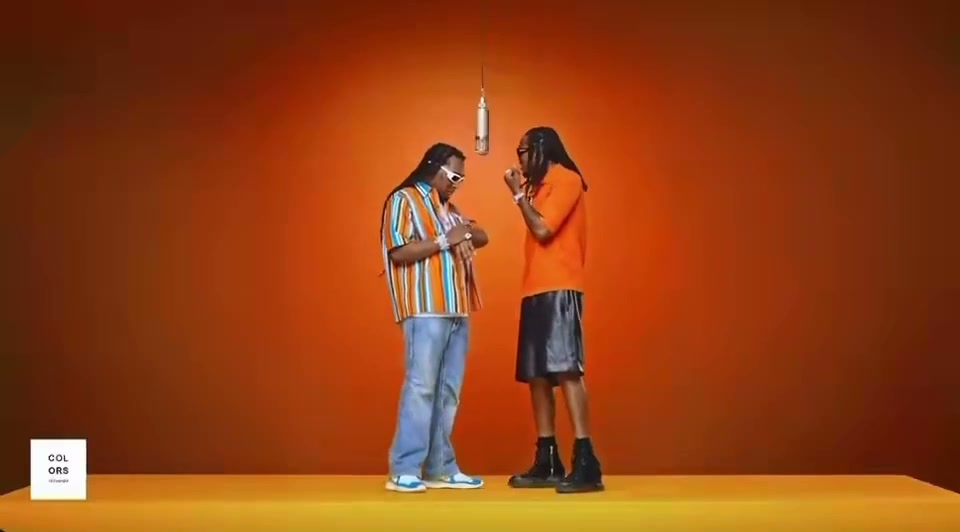
Watch the opening and listen to the clip before generating. Your result uses this exact segment as its input.
What will change
The left performer takes the first portrait’s identity; the right performer takes the second. The model is asked to preserve the scene, gestures and camera movement.
Small timing differences are aligned to the source length. Face quality and lip sync need your review.
Your cast
Photos are kept in this browser for up to 24 hours so you can return after checkout. If browser data is cleared, you may need to upload again.
Resolution & frame480p · 16:9
Reviewing is free. Credits are reserved only after your final confirmation.
Watch a completed Hotel Lobby AI example or check video credits and pricing before you generate.
Make a Migos AI video in three steps.
- 01
Choose the two performers
Upload a separate, well-lit portrait for each consenting adult. The first photo maps to the performer on the left and the second maps to the performer on the right, so use the swap control if the casting order needs to change.
- 02
Preview the Hotel Lobby source
Watch the prepared performance with sound before creating. Pick 5, 12 or approximately 30 seconds, select 480p or 720p, and choose whether the finished file stays 16:9 or is cropped to square or vertical.
- 03
Generate and inspect the result
Confirm the credit quote and submit one generation. When processing finishes, compare both identities, the first frame, gestures and mouth timing with the source, then download the completed MP4.
A search name for the Hotel Lobby duo format.
Migos AI is not the name of an official Migos product or a general-purpose AI model. Online, the phrase usually points to AI recasts of the recognizable two-person Hotel Lobby performance associated with Quavo and Takeoff: two performers share one frame, trade parts of the performance and move against the same simple stage.
EasyVideoAI focuses on that specific cast-replacement workflow. Your two portraits supply the new identities while the prepared source supplies the staging, movement, camera direction and timing. The original audio for the chosen segment is restored after generation; the tool does not clone either uploaded person’s voice or create a new rap recording.
Independent tool. Not affiliated with or endorsed by Migos, Quavo, Takeoff’s estate or the original performance platform.
 12s test result · still frame
Get a more consistent two-person result.
Give each identity its own image.
Use one person per photo, facing forward or at a gentle angle. Sharp eyes and an uncovered face give the model a clearer identity signal than a group shot, distant crop, sunglasses or a heavy beauty filter.
See portrait guidelinesTreat left and right as two roles.
The positions are not interchangeable after the request is submitted. Preview the source, decide who should occupy each side, and use Swap sides before generating if the personalities or visual balance work better in the opposite order.
Review the source workflowCreate with permission, not impersonation.
Only upload adults who agreed to appear. Do not use the result to suggest an endorsement, a real event or a statement that never happened. You also need the necessary rights before publishing source music or footage.
Read the usage termsMigos AI questions, answered.
What the name means and how this generator works.
Photo and video privacyWhat is Migos AI?
Migos AI is a popular search name for AI videos that recast the two-person Hotel Lobby performance associated with Quavo and Takeoff. It describes a video trend, not an official Migos app, model or endorsement.
Is Migos AI the same as Hotel Lobby AI?
In this context, yes. People use Migos AI, Hotel Lobby AI, Migos AI video and AI rap duo for the same basic format: two replacement performers in a recognizable shared performance.
How many photos do I need?
You need two separate portraits, one for each performer. Use one clear adult face per image. The left upload maps to the left role and the right upload maps to the right role.
Does the generator make a new Migos song or clone voices?
No. The studio edits a prepared video segment and restores that segment’s original audio. It does not create a new song and does not clone the voices of the people in your portraits.
Can I make a vertical Migos AI video?
Yes. You can choose a centered 9:16 crop after generation, or use 1:1 or the original 16:9 frame. Because the source contains two people side by side, check that a narrow crop does not remove important action.
Is EasyVideoAI affiliated with Migos, Quavo or Takeoff?
No. EasyVideoAI is an independent project and is not affiliated with or endorsed by Migos, Quavo, Takeoff’s estate or the original performance platform.