
Hotel Lobby
Character Swap
Replace both visible performers in the prepared Hotel Lobby clip with your own two-person cast. Upload one portrait for each side, preview the movement and framing, then generate a character-swapped video with the source segment’s audio restored.
Your performance studio
Two portraits. The original clip from 0 seconds. Original audio.
Original performance
Starts at 0:00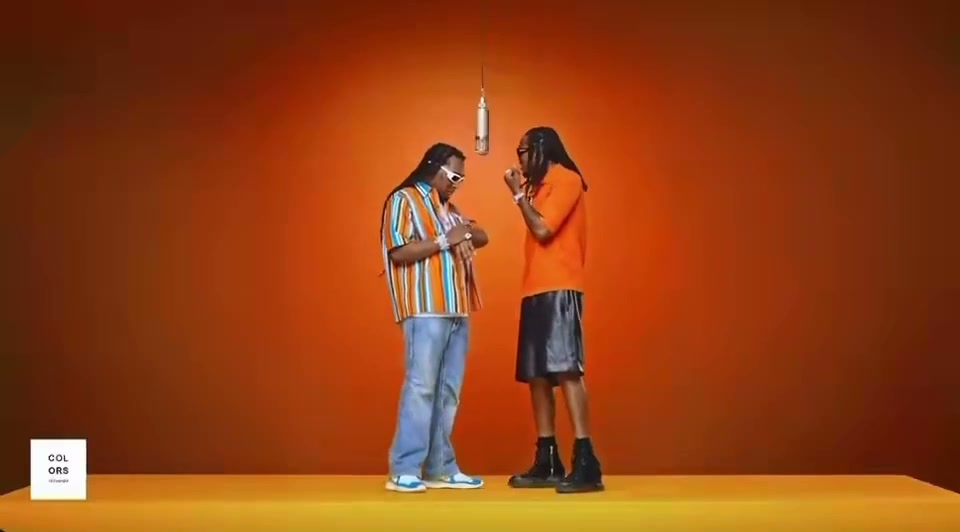
Watch the opening and listen to the clip before generating. Your result uses this exact segment as its input.
What will change
The left performer takes the first portrait’s identity; the right performer takes the second. The model is asked to preserve the scene, gestures and camera movement.
Small timing differences are aligned to the source length. Face quality and lip sync need your review.
Your cast
Photos are kept in this browser for up to 24 hours so you can return after checkout. If browser data is cleared, you may need to upload again.
Resolution & frame480p · 16:9
Reviewing is free. Credits are reserved only after your final confirmation.
Watch a completed Hotel Lobby AI example or check video credits and pricing before you generate.
Swap both Hotel Lobby characters in three steps.
- 01
Supply one identity for each role
Add a clear image of the adult who should take the left position and a separate image for the right position. The current workflow replaces both roles together; it is not a single-face filter applied to only one performer.
- 02
Inspect what the source asks them to do
Watch the prepared clip before generating. Pay attention to turns, hand movements, side-to-side interaction and the opening pose, then choose how many seconds from 0:00 and which resolution you want.
- 03
Validate the character swap
When the output is ready, check that each identity remains on the intended side and stays recognizable through motion. Review clothing changes, hands, facial detail, the crop and lip timing before downloading or sharing.
A full-video recast, not a live camera filter.
Hotel Lobby character swap describes replacing the two people in an existing performance with two new visual identities. Unlike a live filter, the process generates a new video after you submit the portraits. Unlike a simple still-image face swap, it must keep both identities coherent while the performers move, turn and interact over multiple seconds.
The stage, choreography, camera movement and timing come from the prepared source. Your inputs control who occupies the two roles, while the format controls determine length, resolution and crop. The current EasyVideoAI version does not accept wardrobe prompts or redesign the room; visual details may still change as part of AI generation and should be checked in the completed file.
Independent tool. Not affiliated with or endorsed by Migos, Quavo, Takeoff’s estate or the original performance platform.
 12s test result · still frame
Give each replacement character a clean reference.
Avoid ambiguous group photos.
Crop each reference to a single adult with a visible face. When several people appear in one upload, the model may not know which identity should occupy the assigned Hotel Lobby role.
Use the photo checklistConfirm the sides before checkout.
The two roles follow the source performance and are submitted together. Use the preview and Swap sides control before generation; changing the order later requires a separate request rather than editing an existing result.
Review the generation flowJudge the whole clip, not one frame.
A good thumbnail can hide identity drift during turns or gestures. Play the full output and inspect both people at difficult moments, including covered faces, fast hands and changes in camera distance.
Compare source and resultHotel Lobby character swap FAQ.
Roles, photos, source controls and output review.
Photo and video privacyWhat is a Hotel Lobby character swap?
It is an AI-generated recast of the two-person Hotel Lobby performance. Two portrait references replace the visible performer identities while a prepared source guides the scene, motion and timing.
Is this a face swap or a complete character swap?
The model regenerates the performers from portrait references, so details beyond the face can change. Treat it as a video character recast, not a precise pixel-level face overlay or live filter.
Can I replace only one Hotel Lobby performer?
The current studio requires two portraits and submits both roles as one generation. If you want one person to appear on both sides, you still need to supply an image for each slot and review the consent and impersonation rules.
Can I change clothing, the room or the choreography?
No dedicated controls for those changes are available here. The source supplies the stage and motion, and the portraits supply identity references. AI may vary visual details, but those variations are not precise wardrobe or scene controls.
How long can the character-swapped video be?
You can choose the first 5, 12 or approximately 30 seconds of the prepared source. Available generation resolutions are 480p and 720p, with 16:9, 1:1 and 9:16 delivery options.
How private are the uploaded character photos?
Personal uploads and results are not added to the public concept gallery. Review the privacy policy for current storage, processing and deletion details before submitting any portrait.