
Migos Hotel Lobby AI
Generator
Recast the Hotel Lobby duo performance with two portraits. This page keeps the full EasyVideoAI studio workflow: preview the prepared source, assign one person to each side, choose duration and output format, then generate and review the MP4.
Your performance studio
Two portraits. The original clip from 0 seconds. Original audio.
Original performance
Starts at 0:00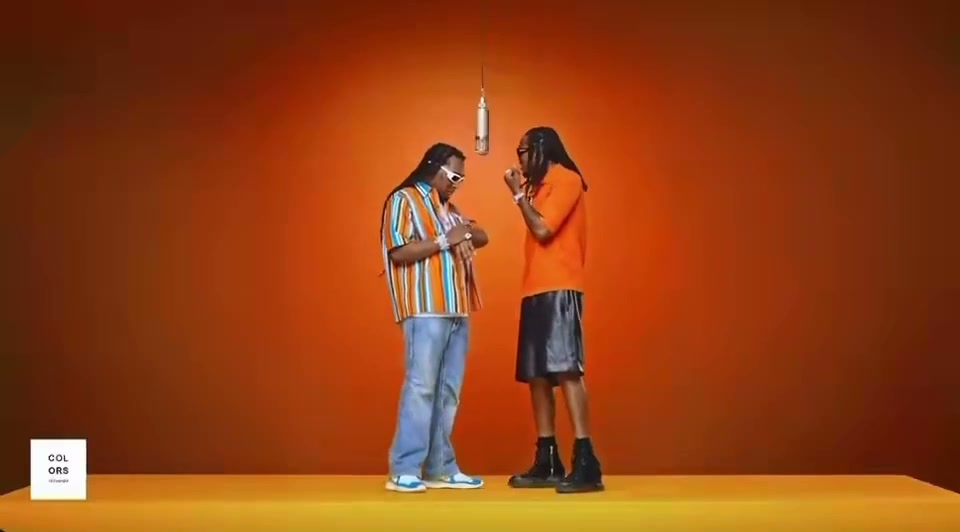
Watch the opening and listen to the clip before generating. Your result uses this exact segment as its input.
What will change
The left performer takes the first portrait’s identity; the right performer takes the second. The model is asked to preserve the scene, gestures and camera movement.
Small timing differences are aligned to the source length. Face quality and lip sync need your review.
Your cast
Photos are kept in this browser for up to 24 hours so you can return after checkout. If browser data is cleared, you may need to upload again.
Resolution & frame480p · 16:9
Reviewing is free. Credits are reserved only after your final confirmation.
Watch a completed Hotel Lobby AI example or check video credits and pricing before you generate.
Recast the Hotel Lobby performance carefully.
- 01
Match each photo to a stage position
Pick one clear portrait for the left performer and another for the right. The source is a shared shot, so position is part of the casting. Preview who leads and how the two roles move before locking in the order.
- 02
Select the source segment and output
Every available clip begins at the original 0:00. Choose the first 5, 12 or approximately 30 seconds, then select 480p or 720p and a 16:9, 1:1 or 9:16 finished frame.
- 03
Compare source and generated video
After processing, inspect the opening, both faces, hands, clothing and camera placement. Listen to the restored source track and verify the timing; a familiar song does not guarantee perfect mouth movement in an AI edit.
It refers to the performance, not a hotel setting.
Migos Hotel Lobby AI combines the artist-group search term with the title linked to the source performance. The recognizable scene is a clean studio setup with two people sharing the frame, rather than footage recorded in an actual hotel lobby. That distinction helps explain why searches for Hotel Lobby AI, Migos AI and the orange-stage duo often lead to the same format.
The generator keeps the performance structure consistent and changes the identities from your two references. It is therefore closer to a guided character recast than a text-to-video canvas. You cannot select a later start time or upload an unrelated source clip here; the settings control how much of the prepared opening is used and how the generated result is delivered.
Independent tool. Not affiliated with or endorsed by Migos, Quavo, Takeoff’s estate or the original performance platform.
 12s test result · still frame
Know what changes—and what stays fixed.
The two performer identities change.
Your portrait references tell the model who should appear on the left and right. Clear, individual photos improve the chance that each identity remains distinct as the performers turn, gesture and interact.
Prepare both photosThe source directs the performance.
The clip determines the opening, stage, camera path, timing and gestures. Longer duration includes more footage from the same beginning; it does not jump to a favorite verse or invent a new scene.
Understand the sourceThe frame can be cropped after generation.
Keep 16:9 for the source composition or request a centered square or vertical output. Since two people share the wide original, always check shoulders, gestures and spacing after a narrower crop.
Choose output settingsMigos Hotel Lobby AI FAQ.
The source, cast, audio and available controls.
Photo and video privacyWhat does Migos Hotel Lobby AI mean?
It is a search phrase for AI recasts of the Hotel Lobby duo performance associated with Quavo and Takeoff. The format replaces two performers with new identities while following the source video.
Was the original scene filmed in a hotel lobby?
No. Hotel Lobby is the song title connected with the performance. The visual people recognize is a simple studio performance, not a literal hotel lobby.
Can I choose a different part of the song?
Not in the current studio. All offered durations start at 0:00 of the prepared source. Choosing a longer option includes more footage from that same beginning.
Does each portrait control a specific performer?
Yes. Image 1 is assigned to the left role and Image 2 to the right role. Use the swap control before generation when you want to reverse the casting.
What resolution and aspect ratios are available?
The studio offers 480p and 720p generation. You can keep the original 16:9 frame or receive a centered 1:1 or 9:16 crop after generation.
Can I publish the finished video anywhere?
Only if you have permission for the portraits, source material and audio, and your use follows the destination platform’s rules. Generating a file does not transfer music, footage or personality rights.