
Make a Hotel Lobby AI video
from two photos.
EasyVideoAI replaces both people in a prepared Hotel Lobby performance using two portraits. Choose the length and frame, review the credit quote, then download a private MP4 with the source audio. The current studio does not accept your own source video.
Your performance studio
Two portraits. The original clip from 0 seconds. Original audio.
Original performance
Starts at 0:00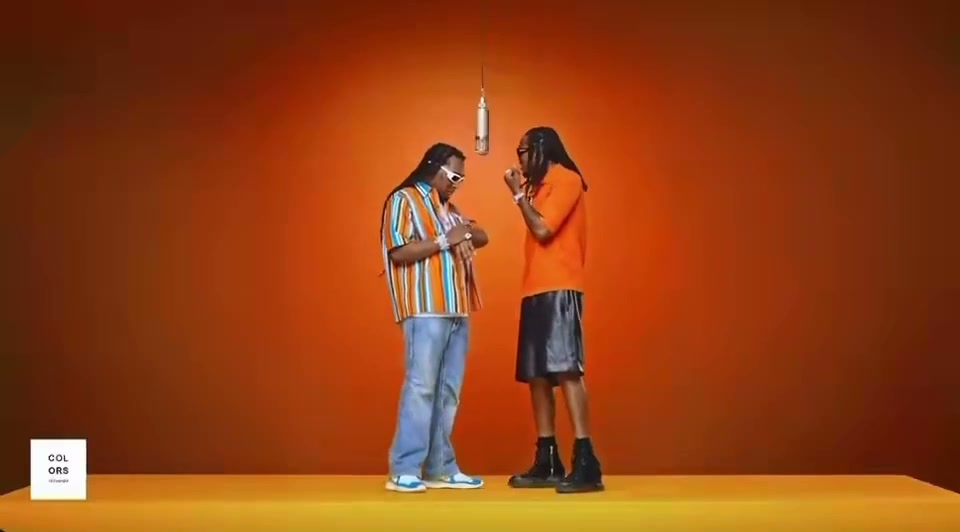
Watch the opening and listen to the clip before generating. Your result uses this exact segment as its input.
What will change
The left performer takes the first portrait’s identity; the right performer takes the second. The model is asked to preserve the scene, gestures and camera movement.
Small timing differences are aligned to the source length. Face quality and lip sync need your review.
Your cast
Photos are kept in this browser for up to 24 hours so you can return after checkout. If browser data is cleared, you may need to upload again.
Resolution & frame480p · 16:9
Reviewing is free. Credits are reserved only after your final confirmation.
Your duo, in three steps.
- 01
Upload two portraits
Add one consenting adult per image. JPEG, PNG and WebP files up to 10 MB each are supported. Image 1 maps to the left role; image 2 maps to the right.
- 02
Choose the prepared clip
Preview the source, then choose 5, 12 or approximately 30 seconds, 480p or 720p, and the original, square or vertical frame. Each cut starts at 0:00.
- 03
Review and download
Check the credit quote before generating. When the MP4 is ready, compare both faces and the movement with the source and listen to its restored audio.
The movement comes
from your original clip.
EasyVideoAI is built for Hotel Lobby AI videos: two people share a stage, follow the same rhythm and interact in the same shot. Your portraits supply the identities; the source clip supplies the action.
The current workflow edits the people in the original footage using your portrait references. It asks the model to retain the opening, background, gestures and camera movement. After generation, the original audio is restored and the file is checked before it appears as a completed result.
AI likeness and lip sync can vary. Always review the output against the original.
 12s test result · still frame
Prepare the faces. Check the source.
One clear face in each image.
Choose sharp, well-lit photos with the face visible. Avoid sunglasses, heavy filters, group shots and extreme side profiles. JPEG, PNG and WebP portraits up to 10 MB are supported.
Photo preparation tipsUse people and media with permission.
Both people must be adults and agree to this use of their likeness. Check your rights to the footage and audio too, especially before publishing or using the result commercially.
Read the usage termsCompare the whole performance.
Look at both identities, the opening frame, hand movements, camera position and mouth timing. Original audio alone does not guarantee perfect lip sync. Keep the result private until you have reviewed it.
Explore the visual conceptsA few things
to know.
How the source, portraits and sound work together.
About EasyVideoAIWhat is a Hotel Lobby AI video?
It is a video that replaces the two performers in a prepared Hotel Lobby performance with people from two portraits. The source supplies the stage, gestures and camera movement; its audio is restored to the completed MP4. Watch a completed 12-second example.
Is Hotel Lobby AI free to use?
No free generation trial is currently offered. You can watch the source and completed example without paying. Creating a video uses credits: a 12-second 480p video costs 960 credits at the current published rate; the $10 Starter pack contains 1,000 credits. The studio shows the exact quote before you confirm. See pricing.
Do I need one photo or two?
You need two separate portraits, with one consenting adult face in each JPEG, PNG or WebP file (up to 10 MB per file). The left and right upload slots determine who replaces each performer.
Do I need to upload a source video?
No. The studio provides the performance clip and starts every available segment at 0:00. Uploading your own source video is not supported in the current website.
Will the result keep the original audio?
Yes. The selected source segment’s audio is restored after generation. The tool does not clone either person’s voice, and exact lip sync still needs a visual check.
How long can the video be?
The studio offers the first 5, 12 or approximately 30 seconds, at 480p or 720p. You can keep the original 16:9 frame or crop to 1:1 or 9:16 after generation. Vertical and square crops cut the sides of this two-person shot.
How much does a video cost?
At the current published rate, a 12-second video costs 960 credits at 480p or 2,160 credits at 720p. The Starter pack is $10 for 1,000 credits. The exact credit quote appears in the studio before Generate; compare all durations and packs.
Are my photos or results shown publicly?
Your personal media is not added to the public gallery. The studio uses private storage for submitted materials, and the public concepts use fictional adults. Read the privacy policy before submitting portraits.
Will both faces and the performance be exact?
AI can change facial details, hands, clothing and movement. The workflow asks the model to preserve the original performance, but an exact match is not guaranteed. Compare the opening, both faces, gestures, framing and lip sync with the source.
Can I publish the result anywhere?
Only where you have the necessary portrait, footage and audio rights and follow that platform’s rules. Both portrait subjects must be consenting adults. Do not present the AI edit as real footage or an endorsement; review the usage terms before sharing.
Should I use this, a CapCut template or Higgsfield?
Use this studio for a prepared two-person performance recast from portraits. CapCut templates suit editing replaceable clips and text; Higgsfield offers broader video generation controls. See the workflow comparison before choosing.