
Migos AI Trend
Video Generator
Seen the two-person orange-stage clips and want to make the Migos AI trend yourself? Upload two separate portraits, assign the left and right roles, and use the same working studio as the EasyVideoAI homepage.
Your performance studio
Two portraits. The original clip from 0 seconds. Original audio.
Original performance
Starts at 0:00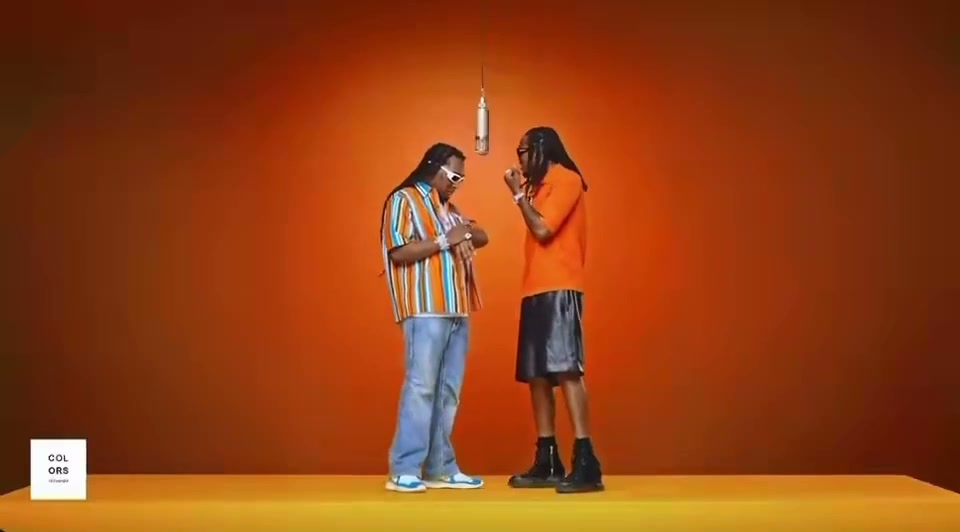
Watch the opening and listen to the clip before generating. Your result uses this exact segment as its input.
What will change
The left performer takes the first portrait’s identity; the right performer takes the second. The model is asked to preserve the scene, gestures and camera movement.
Small timing differences are aligned to the source length. Face quality and lip sync need your review.
Your cast
Photos are kept in this browser for up to 24 hours so you can return after checkout. If browser data is cleared, you may need to upload again.
Resolution & frame480p · 16:9
Reviewing is free. Credits are reserved only after your final confirmation.
Watch a completed Hotel Lobby AI example or check video credits and pricing before you generate.
Join the trend without learning an editor.
- 01
Cast a pairing with a clear idea
Choose two consenting adults whose pairing has a reason: friends, siblings, partners or coworkers. Use an individual portrait for each person so the model can distinguish the left identity from the right throughout the clip.
- 02
Choose a trend-friendly cut
Preview the original opening and select the first 5, 12 or approximately 30 seconds. Keep 16:9 for the complete stage or choose a centered 9:16 or 1:1 crop when the destination is Shorts, Reels or TikTok.
- 03
Check the edit before posting
Generation is not the final review. Watch the whole result, confirm both faces stay in the intended positions, listen for the restored source audio, and inspect hands, clothing, framing and lip timing before you publish.
A simple stage makes every new pairing obvious.
The Migos AI trend uses a visually direct idea: keep the familiar two-person performance and change the cast. Because both people remain in one uncluttered frame, viewers understand the joke or pairing immediately. The result works especially well when the relationship between the two new performers is recognizable without extra explanation.
This page is built for people who already know the trend and want a practical way to try it. It does not require a prompt, keyframes or manual audio syncing. The prepared clip controls the motion; your portraits control the identities; the selected aspect ratio controls how the finished performance is framed for the platform where you plan to share it.
Independent tool. Not affiliated with or endorsed by Migos, Quavo, Takeoff’s estate or the original performance platform.
 12s test result · still frame
Plan the trend before you press generate.
Make the relationship easy to read.
The strongest trend ideas usually have a clear connection or contrast: two close friends, a couple, family members or colleagues. A random pair can still work, but the viewer should understand the premise in the first few seconds.
Watch the completed exampleChoose the platform before the crop.
The original wide frame gives both performers the most room. Vertical and square options are centered crops created after generation, so preview the source and expect some material at the sides to be removed.
Compare output settingsLabel an AI edit honestly.
Do not present a synthetic recast as authentic footage. Confirm consent, avoid deceptive captions, and be especially careful with public figures or people who cannot approve the use of their likeness.
Check the publishing rulesAbout the Migos AI trend.
Origin, format and practical creation choices.
Photo and video privacyWhat is the Migos AI trend?
It is a wave of AI-edited duo videos based on the recognizable Hotel Lobby performance format associated with Quavo and Takeoff. Creators replace the two people while retaining the source staging and movement.
Why do people also call it the Hotel Lobby trend?
Hotel Lobby is the song connected with the original performance. Migos AI trend and Hotel Lobby AI trend are two common search phrases for the same family of recast videos.
Do I need a video-editing app or a prompt?
No. This studio uses a prepared source, so you do not need to write a motion prompt or sync audio on a timeline. You provide two portraits and choose the available duration, resolution and frame.
Which duration is best for a social post?
Use the duration that contains the moment you want viewers to see. Shorter clips are quicker to review; longer clips demand more consistent identities. Every option on this page starts from 0:00 of the prepared source.
Can I use photos of celebrities or characters for the trend?
You should only use likenesses and media you are authorized to use. EasyVideoAI requires consenting adults and prohibits deceptive or harmful impersonation. A trend does not remove permission, publicity or copyright obligations.
Will the trend video have perfect lip sync?
Not necessarily. The original audio is restored, but AI-generated facial motion can vary. Watch the entire result and compare mouth timing, identities, gestures and the first frame with the source before sharing.