
1. Preview the complete invisible motorcycle chase
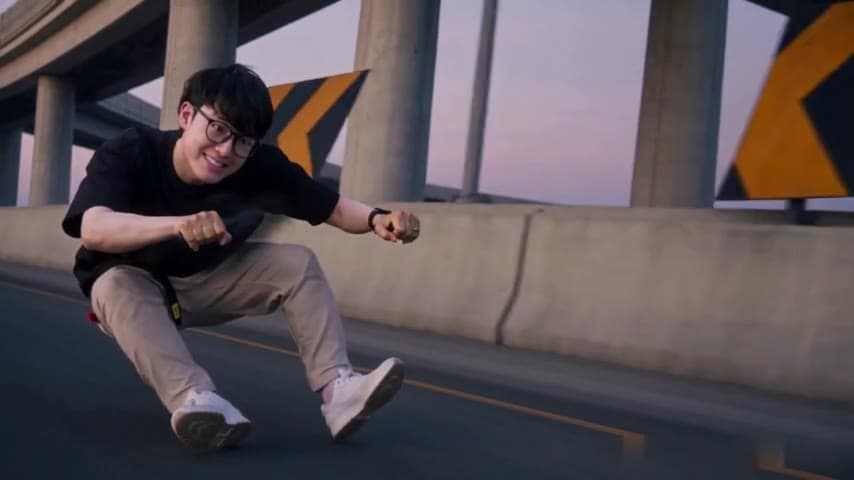
Open the Crazy Frog AI video generator and watch the landscape demonstration. A rider crouches with hands on imaginary handlebars, reacts to a pursuing motorcycle officer, looks back, flips and lands, then speeds away beneath an overpass. Your portrait changes the rider; the scene supplies the action.
The demonstration is a completed Wan 3.0 example using the supplied glasses-wearing person in a black T-shirt and beige trousers. At the owner's request, that completed footage is also the template's private generation source. These roles have separate files and configurations.
2. Add one clear photo for the rider
Use a JPEG, PNG or WebP image up to 10 MB and at least 256 × 256 pixels. Give the photo one obvious person, with the eyes, nose, mouth and hair visible. A front-facing view or gentle angle is easier to compare than a face hidden by a helmet, dark glasses or motion blur.
The portrait guides the rider’s face, hair, visible accessories and clothing. You do not need to sit on a bike or imitate the crouch. Clothing outside the photo is completed by the model. There is one upload slot: the officer and background are not assigned new portraits.
3. Keep the full frame or inspect the crop
This template uses the full 14-second scene. It does not offer a shorter segment or a later starting point. Choose 480p or 720p separately from the output frame; the resolution affects the credit quote.
Original preserves the complete landscape composition. Square and 9:16 output use centered crops, which can remove the officer, hands or feet. Watch the preview through the chase before deciding whether a narrow frame suits your post.
4. Confirm permission and review the quote
Confirm that you have permission to use the person’s likeness. The studio supplies the reference and generation instructions, so you do not need to paste a Crazy Frog prompt or upload another source film. Review the selected photo, resolution, frame and exact credit amount before final confirmation.
A new personalized render uses credits; watching the public demonstration and case is free. Buying credits is separate from starting a video. If submission becomes uncertain, check the existing request or My videos before opening another paid attempt.
Understand EasyVideoAI credits · Understand the prepared Crazy Frog AI prompt
5. Check the identity, flip and sound
Watch the entire completed file. Compare the face during close-ups and turns, check that the hands still suggest handlebars and inspect the body during the flip and landing. The rider’s motorcycle should remain invisible; the officer should remain a different character on the white futuristic bike.
The model receives silent video, then the application restores audio from the matching private source. Listen to the downloaded MP4, including the beginning and ending. A playable file does not guarantee perfect identity or motion in every frame. Identify the problem before paying for another attempt.
Reviewed against the EasyVideoAI studio on October 20, 2026. Check the live studio for current availability and the final credit quote.