
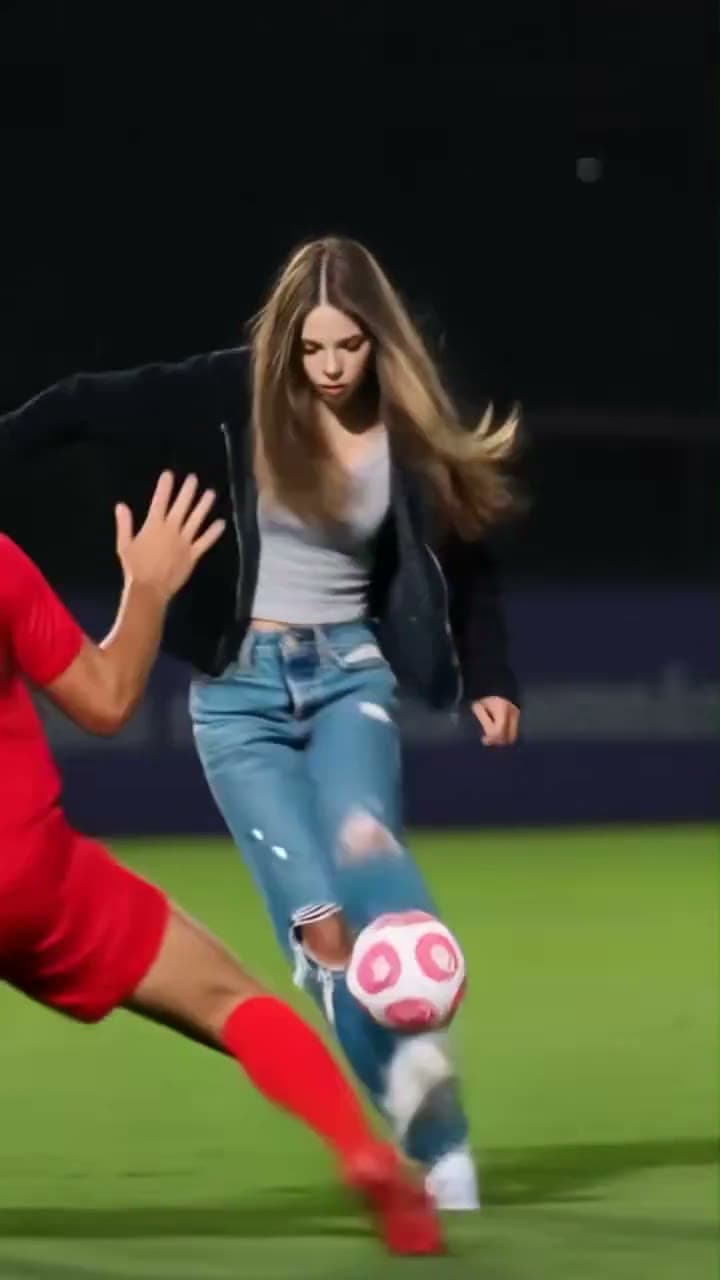
1. Identify the attacker in this reference
Watch the supplied preview in the Ozil Goal AI Video Generator before choosing a photo. This is an AI recreation inspired by Özil’s football goal, rather than original match broadcast footage. The target is the central attacker in a black jacket, gray top and blue jeans. Other players, including the red-shirted opponents, are not your replacement targets.
The full supplied video ends during the dribble. It does not show the ball crossing the goal line, so a personalized result should follow the same ending. Choosing the full clip preserves all of this reference; it does not add a finish beyond it.
2. Upload one clear face and an outfit reference
Choose one person in a sharp, evenly lit photo. Keep the face, hair and enough clothing visible to recognize them. A waist-up or full-body image can supply outfit information, but a distant face may lose useful facial detail. You do not need to pose while playing football.
Use JPEG, PNG or WebP up to 10 MB. Check the selected thumbnail and the Goal scorer with the ball role label. There is only one portrait slot: uploading another person for a defender is not part of this template. Confirm that you have permission to use the person’s likeness.
3. Choose 5 seconds or the full 9.71-second clip
Every option begins at the original first frame. The 5-second cut covers the opening; choose Full clip · 9.71s to retain the later turns and footwork. The full source keeps its fractional duration, while the quote uses 10 started seconds.
Original framing keeps the complete 720 × 1280 reference composition. You can select 480p or 720p for the output. A square crop can remove part of the ball, feet or nearby opponent; review the frame before selecting it. The output resolution is a setting, not a promise that the reference will gain new detail.
| Source choice | 480p | 720p |
|---|---|---|
| Opening · 5 seconds | 400 credits | 900 credits |
| Full · 9.71 seconds, quoted as 10 | 800 credits | 1,800 credits |
4. Review the quote and confirm once
The studio’s current quote is the final reference for your selected duration and resolution. Watching the preview and selecting settings do not spend generation credits. After you confirm, the request reserves the quoted credits; a confirmed failed generation follows the failure and refund workflow.
If progress takes longer than expected, open the existing request rather than submitting the same video again. A lost connection or a delayed status update does not establish that the generation failed. Keep the request reference if you need help.
Find an existing video request · Review current credit pricing
5. Check the face, feet and ball together
Review the result at the opening, the raised-ball moment, each turn and any overlap with a defender. Look for a consistent face and outfit, then check foot-to-ball contact and whether the pink-and-white ball keeps a continuous path. A good opening frame alone is not enough to assess a moving football edit.
Listen to the restored source audio and compare the ending with the supplied preview. If the output stops at the same dribbling moment, the absence of a net shot is a source limitation. If the player identity or ball contact changes unexpectedly, use the photo and result checklist before spending credits on another generation.
Check football result problems by symptom · Understand source audio restoration
Reviewed against the EasyVideoAI studio on October 19, 2026. Check the live studio for current availability and the final credit quote.