
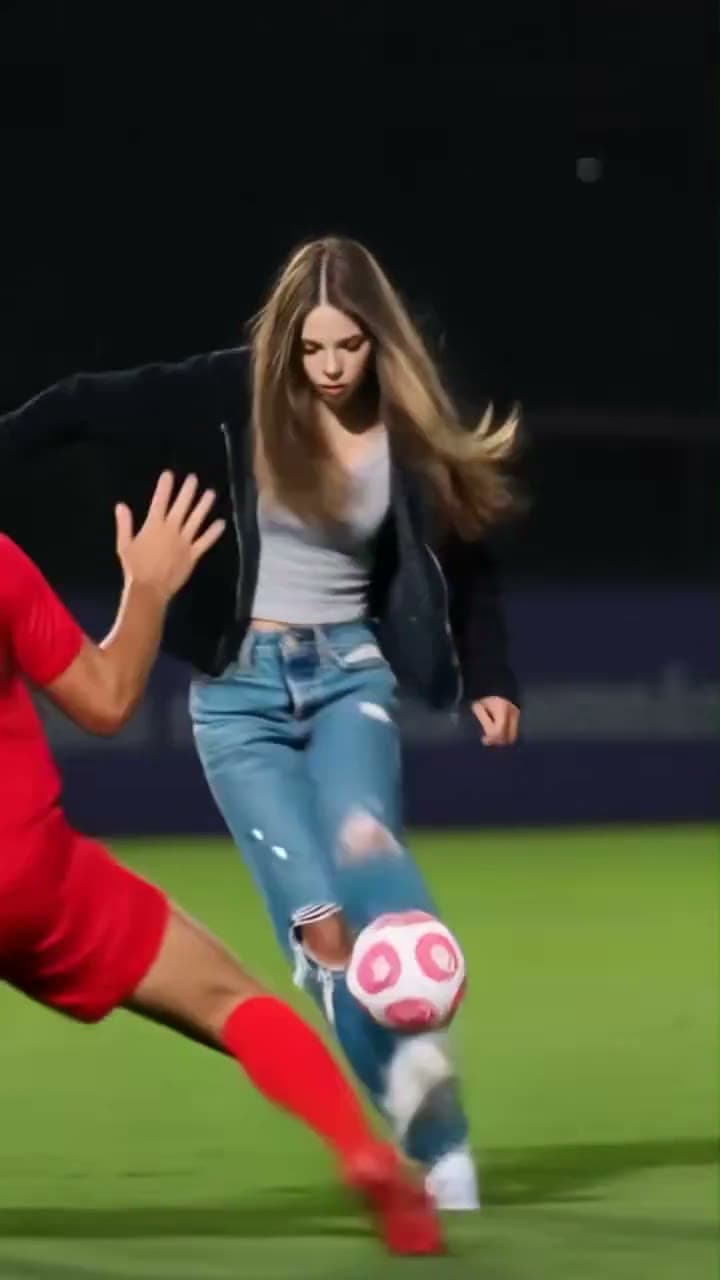
What the Ozil Goal AI prompt controls
To recast the Ozil Goal attacker, the portrait supplies the attacker’s face, hair and clothing. The video supplies the football action, ball path, other players and camera movement. EasyVideoAI prepares these instructions for you; its studio has no custom-prompt field.
The intended direction is: replace only the ball-carrying attacker with the person in Image 1. Follow that person through the lob, dribble and turns. Preserve the pink-and-white ball, foot contacts, goalkeeper, defenders, pitch and camera movement. Keep the reference ending during the dribble.
This explains the template’s direction. Prompt wording cannot guarantee perfect identity or ball contact in every frame, and a photo cannot add a goal shot that is absent from the supplied clip.
Keep facial detail readable in a full-body scene
The attacker moves through a vertical, full-body football scene. A reference with visible eyes, nose, mouth and hair gives you specific features to compare with the result. Avoid sunglasses, strong beauty filters, a face hidden by a hand or a small face lost in a large background.
A waist-up or full-body photo can communicate an outfit. Do not sacrifice facial clarity simply to include the entire body: choose a closer, sharper reference if the face is otherwise difficult to recognize. The studio accepts JPEG, PNG and WebP files up to 10 MB.
Choose the clothes you want the attacker to wear
The prepared direction uses your photo for the attacker’s face, hair and clothing. You do not have to wear a football kit. Visible colors and garment shapes give you a clearer reference than a tight face crop; clothing outside the photo has to be completed by the model.
Check the chosen thumbnail before confirmation. A group photo gives competing faces and outfits, and this studio has no second role for assigning a defender. The original attacker’s jacket and jeans identify the target in the preview; they are not a requirement for your replacement outfit.
Separate a reference problem from a motion problem
Compare the complete result with the public preview before deciding what to change. The reference contains a specific attacker, ball path and ending. A new portrait may help with an unclear likeness, but it does not add a new camera angle or a missing goal shot.
| What you see | Check first | Useful next step |
|---|---|---|
| The wrong player changes | The ball carrier’s role and your selected thumbnail | Use the single attacker slot; report a wrong-role output with its request reference |
| Face changes during a turn | Face visibility, blur and occlusion in the photo and scene | Choose a clearer reference and compare the same frames |
| Ball or feet jump | Ball trajectory and foot contacts against the preview | Treat this as a motion issue; an identical retry is not guaranteed to repair it |
| Outfit changes midway | How much clothing the photo actually shows | Use a clear outfit reference and review turns and overlaps |
| No ball-in-net shot | The original supplied ending | The source stops during the dribble; no extra finish is included |
Keep the feet and ball inside the frame
Original framing preserves the complete vertical reference. A square crop may remove the ball at the edge or part of an opponent’s movement, even when the player’s face remains visible. Check the preview across the whole cut rather than judging the crop from one still.
Choose the full 9.71-second option if you want the later turns in the supplied recreation. The shorter 5-second option covers its opening. The full quote counts 10 started seconds while the restored video and audio use the original fractional duration.
Keep an existing request while diagnosing it
If a request is still processing or its status is uncertain, return to that request instead of opening a second paid generation. For a completed result, changing the photo or settings creates a new request with a new quote. Read the displayed credit status before using a retry control.
For a playback, audio or accounting issue, save the request reference and contact support. Describe the frame or moment you checked: wrong attacker, identity drift, ball contact, missing sound or a status problem. This is more useful than repeatedly changing the photo without identifying the symptom.
Check general generation and retry problems · Contact support about an existing request
Reviewed against the EasyVideoAI studio on October 19, 2026. Check the live studio for current availability and the final credit quote.