
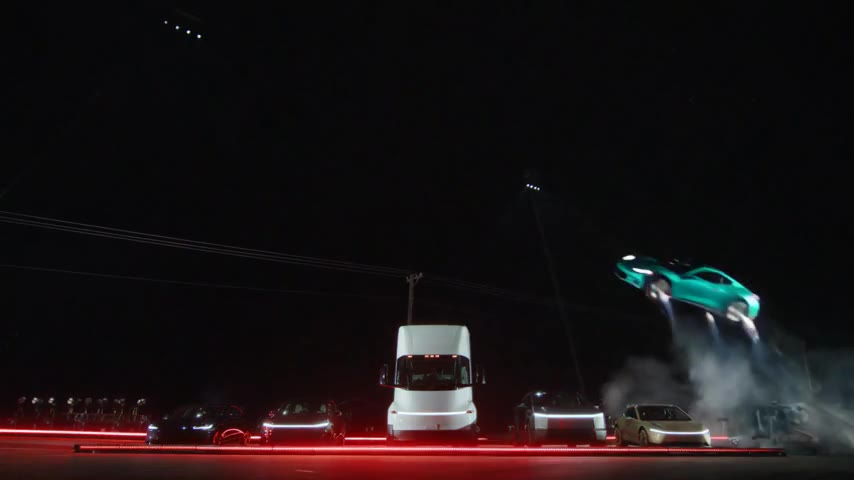
A different reference from the ramp scene
Side Kickflip keeps a wide side camera while the moving car travels across the lineup. Parked vehicles and a truck form the background. The prepared instructions assign your photo to the moving car and ask the stationary vehicles to remain unchanged.
This is a separate action reference, not the opening five seconds of Ramp Flip. Selecting Side Kickflip changes the preview and quote together. The studio demonstration uses a red hatchback; the completed case uses a turquoise coupe. Both are newly generated AI footage.
Flying Car AI studio · Watch the completed Side Kickflip case
Why the card and downloaded clip can round differently
The prepared source contains about 4.77 seconds of picture and is billed as five started seconds. The public case is about 4.8 seconds after frame rounding. These are descriptions of the same short stunt workflow, not a choice between two generation lengths.
The shorter source uses fewer quoted credits than Ramp Flip at the same resolution. A credit pack is a separate purchase; use the quote beside the selected stunt to decide how many generation credits the request needs.
Keep room for the complete sideways path
A side or three-quarter car photo gives the model useful roofline and wheelbase information. Show one complete vehicle in clear light. A tight headlight crop leaves too little evidence for the body that becomes visible during the roll.
Original keeps the full 16:9 lineup and both ends of the flight. A centered 9:16 crop is much narrower, so takeoff or landing may leave the frame. If your final post needs a vertical canvas, you can preserve the landscape clip inside that canvas in an editor instead of cropping away the sides.
Choose between cropping and a landscape insert · Choose a clearer vehicle photo
Check the moving car and parked lineup separately
First compare the uploaded vehicle’s paint, wheel count and body shape at takeoff and landing. Then inspect the background: the parked vehicles should stay in place while the hero car moves over them. Fast rotation can hide a shape change that is easier to spot by pausing the video.
Listen for the generated movement and touchdown sounds. The reference itself is silent; the finished clip is checked for generated audio, but you should still decide whether the effects suit your edit. Download the MP4, mark the scene as AI-generated and review any loop seam before publishing.
See the longer Ramp Flip sequence · Understand the built-in motion instructions
Reviewed against the EasyVideoAI studio on October 26, 2026. Check the live studio for current availability and the final credit quote.