
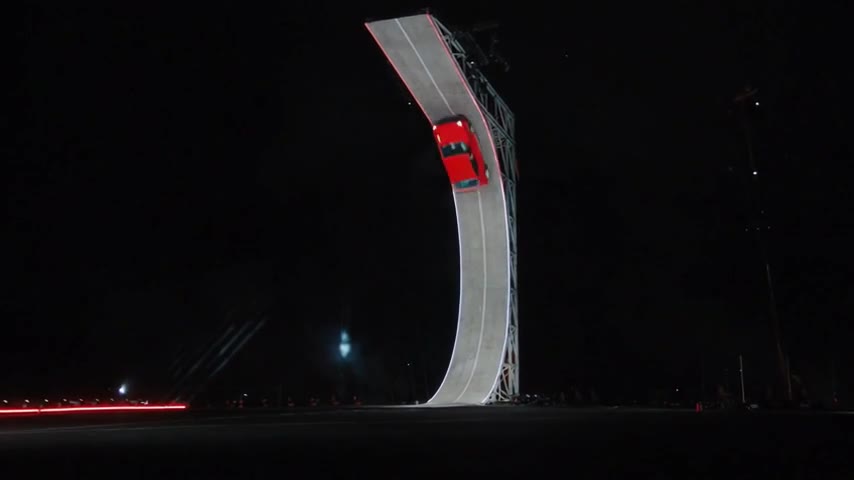
What happens in the Ramp Flip?
The moving car climbs a tall curved wall, turns upside down near the top, leaves the wall, rotates back toward level and lands in vapor. The reference includes the scene and camera changes. Your photo defines the moving vehicle rather than a new arena or a different stunt route.
Watch the completed red-hatchback case as well as the turquoise-coupe demonstration. They are separate AI generations, so they help show how two vehicle shapes interpret the same reference. Neither establishes that your own car will retain every panel, badge or reflection.
Prepare a photo that shows the car’s profile
A side or front three-quarter photo gives the model a readable wheelbase, roof and hood. Leave space around both bumpers and show the visible wheels completely. A simple background makes it easier to distinguish the vehicle from parked cars, people or garage clutter.
The flip reveals surfaces that a single image cannot supply. The model must infer the underside and parts of the rear. If an exact mechanical shape matters, compare those moments carefully; a generated stunt is an imagined action scene.
Choose the complete scene and check the quote
Ramp Flip uses the full prepared reference. It is not a duration slider: choosing the other card changes the reference to Side Kickflip. Ramp Flip has about 8.03 seconds of picture, which is quoted as nine started seconds. The final quote also depends on 480p or 720p quality.
Original preserves the landscape view. Square and vertical output crop the generated frame around its center, so a tall wall or airborne car may approach the crop boundary. Inspect the preview outline before selecting a narrow frame.
Understand Flying Car AI generation credits · Plan a vertical post without losing the flight path
Review four moments before posting
Check the vehicle at the approach, inverted turn, airborne leveling and touchdown. Look for changes in paint, extra wheels, a separating body or a landing outside the frame. Listen to the generated air and landing sounds through the full clip; a visible audio track alone does not prove that every effect is timed correctly.
Save the MP4 from the completed private result page. Label the scene as AI-generated when sharing it. If the long ramp sequence feels too busy for your edit, compare the shorter fixed side view before starting a separate generation.
Compare the Side Kickflip template · Follow the full upload-to-download tutorial
Reviewed against the EasyVideoAI studio on October 26, 2026. Check the live studio for current availability and the final credit quote.